Identity and Entra ID · Blog
Anatomy of an identity compromise
A login-only intrusion, step by step, and where the detection actually lives.
Why nothing fired
When a detection misses, the first instinct is to blame the rule. Wrong threshold, wrong table, wrong logic. Sometimes that is exactly right.
But there is a class of intrusion where every rule can be correct, every event can be present, every log can be enabled and retained, and still nothing fires because no single event in the sequence is anomalous. The attacker never drops a file. Never runs a binary. Never touches an endpoint you have an agent on. They sign in, they change a setting, they read some mail. Each action is one an ordinary user performs on an ordinary Tuesday.
This is the login-only intrusion, and it is the shape most identity compromises take.
What follows is the anatomy: seven steps, the event each one writes, and why each one reads as normal in isolation. Then a real intrusion that ran exactly this way. Then the part that matters: where the detection actually lives, which is never in the row.
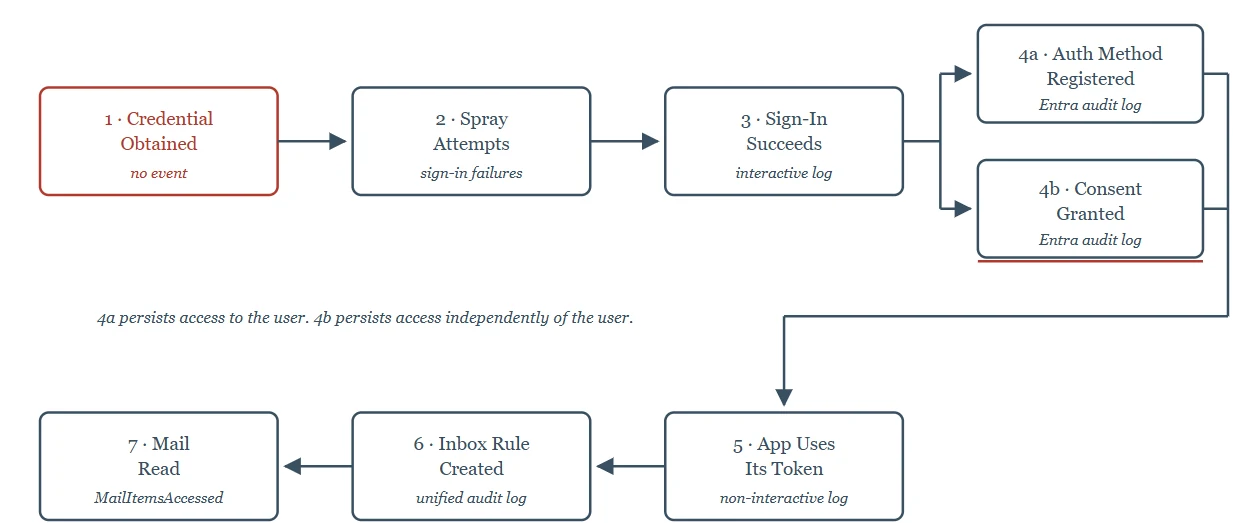
Figure 1 — Anatomy of a login-only intrusion. Seven steps. One writes nothing. The rest write events that look like work.
What each step writes to your logs
| # | Step | Event written | Why it reads as normal |
|---|---|---|---|
| 1 | Credential obtained externally | Nothing in your tenant | The intrusion starts before your telemetry does |
| 2 | Spray attempts | Sign-in log failures: 50126, 50053, 50055 | Failed sign-ins are constant background noise |
| 3 | Sign-in succeeds | Interactive sign-in log: location, Conditional Access result | Valid credential from a plausible place |
| 4a | Auth method registered | Entra ID audit log, Authentication Methods category [13] | Indistinguishable from someone setting up a new phone |
| 4b | Consent granted / app added | Entra audit log: Consent to application, Add service principal, Add OAuth2PermissionGrant | Self-service consent is ordinary in most tenants |
| 5 | App uses its token | Non-interactive sign-in log | No user, no authentication factor, a log view most people never open |
| 6 | Inbox rule created | Unified audit log: New-InboxRule, Set-InboxRule [6] | Users create rules constantly |
| 7 | Mail read | MailItemsAccessed | The account reading its own mail is what the account does |
A few of these deserve more than a row.
Step 2 is not a blind spot; it is an attention problem.
The failures are there, with codes attached: AADSTS50126 for an invalid username or password and AADSTS50053 when an account locks out after too many attempts [1]. Microsoft's own Sentinel analytic rule for password spray keys on exactly this family of failure codes [2]. So the telemetry exists, and a detection for it exists. The question is whether anyone is watching the tenant the spray landed in. Hold that thought for the next section.
One caveat if you build on this: Microsoft states plainly that these error codes are subject to change and that applications taking a dependency on the numbers will break over time [1]. Pin them in a lookup you control rather than hard-coding them into a rule.
Steps 4a and 4b are the same objective reached two different ways, and the difference is the most practically useful thing in this post.
Both steps answer the same attacker question: how do I keep this access after the password I stole gets rotated? They answer it differently, and the two answers fail to different responses.
-
4a attaches the persistence to the user. A new authentication method (an authenticator app or a phone number) is registered against the compromised account. Microsoft's audit logs for authentication methods exist precisely so admins can confirm which users have registered which methods [13]. From the attacker's side, this is cheap and quiet, and it survives a password reset on its own. From the defender's side, it is also the easier of the two to undo: the method belongs to the user object, so reviewing and stripping that user's registered methods closes it.
-
4b attaches the persistence to an application. Consenting to an application creates a service principal in the tenant with permissions of its own, and both the application registration and the permission grant are written as their own audit entries [5]. This is the part worth sitting with: that application does not authenticate as the user. It holds its own credentials and its own permissions. It never needed the stolen password, and it does not care that the password has changed.
Which means the standard credential-compromise runbook – reset the password, revoke the user's sessions, and re-register MFA – closes 4a completely and does nothing whatsoever to 4b. You can run that runbook, mark the ticket resolved, and leave the attacker's access entirely intact.
This is not hypothetical. It is the branch the intrusion in the next section took.
Step 5 is in a log most people have never opened.
Non-interactive sign-ins are a subset of the sign-in logs, performed by a client app on behalf of a user without the user providing an authentication factor, including a client app exchanging an OAuth 2.0 refresh token for an access token [3]. The interactive view, by contrast, is the one that records a person completing an authentication challenge [4]. If your queries only read the interactive view, this step is invisible to you even though it is fully logged.
On step 7: Microsoft's documentation does not agree with itself
One Microsoft Learn page places
MailItemsAccessedin Audit (Standard), enabled by default for users with an Office 365 or Microsoft 365 E3 or E5 licence [7]. Another says capturingMailItemsAccessedoperations requires E5 [8]. A third says mailbox audit events return only for E5 users when you search the unified audit log [9].The event is real either way. Whether it reaches you is a licensing question, and the answer you get depends on which page you read. If you support tenants on Business Premium, do not assume this row is populated. Test it in a tenant you control before you rely on it in an investigation and note that these records are not retroactive, so discovering the gap during an incident is discovering it too late.
An intrusion that ran on identity alone
In late November 2023, the Russian state-sponsored actor Microsoft tracks as Midnight Blizzard ran a password spray against a legacy, non-production test tenant account that did not have MFA enabled [10].
From that foothold, the actor moved through the identity plane and nowhere else. They found a legacy test OAuth application that already held elevated permissions in the corporate environment. They created additional malicious OAuth applications and created a new user account for the sole purpose of granting consent to them. They then used the legacy test application to grant the Office 365 Exchange Online full_access_as_app role and authenticated to Exchange Online through those applications to reach corporate mailboxes [10].
Microsoft has said the actor accessed a small percentage of corporate email accounts, including members of the senior leadership team and staff in cybersecurity and legal functions and exfiltrated emails and attached documents [11]. Microsoft detected the intrusion on 12 January 2024.
No malware. No endpoint. No file written to disk anywhere an EDR agent could see it. Every step is a row in the table above, and step 4b is the branch it took.
Two things worth saying plainly about this case.
-
The first is that the spray in step 2 was not invisible. It was against a legacy, non-production test tenant. Microsoft has not said what monitoring that tenant had, and I am not going to claim it had none. What is documented is the interval: the spray began in late November; detection came in January. Whatever the reason, the events and the attention were not in the same place.
-
The second is scale. This is a nation-state actor against Microsoft's own corporate environment. If you run IT for a forty-seat accounting firm, the adversary in your tenant is not this one, and the lesson does not transfer by analogy. What transfers is the mechanism. The steps are the same steps, the log sources are the same log sources, and the Exchange Online application permissions used here exist in every tenant that has Exchange Online.
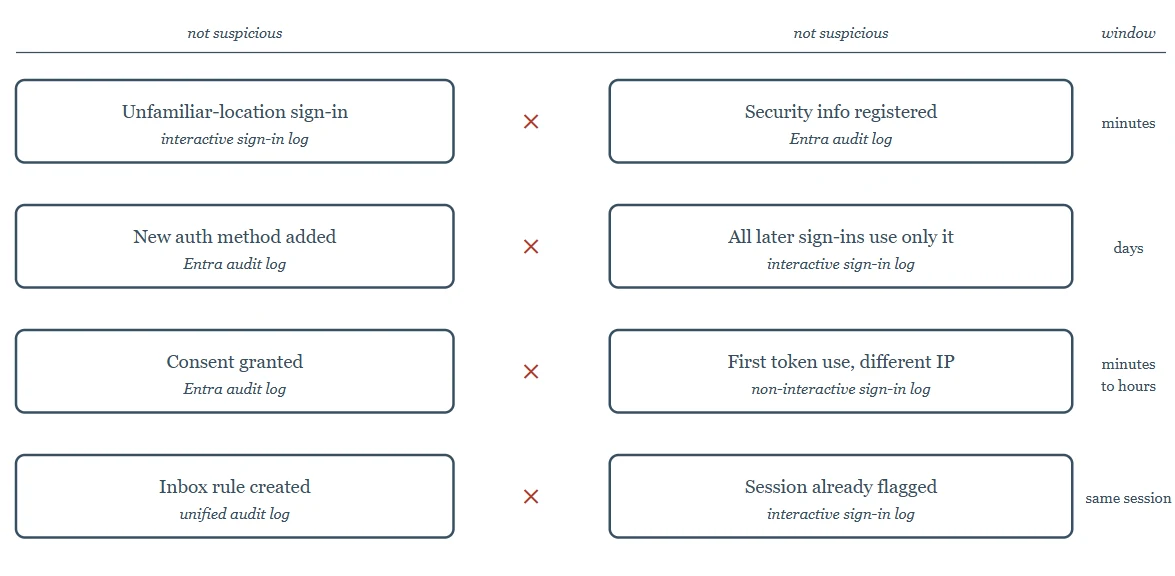
Figure 2 — Where the detection lives. No event on either side is suspicious. Every pair is.
The detection is never in the row
Look back at the table. Every one of those events, taken alone, is something a legitimate user or a legitimate application does. You cannot alert on any of them without alerting on your own organisation going about its day.
The signal is in the join.
-
Unfamiliar-location sign-in × security info registered in the same short window. Users do register new authentication methods. They usually do it from the office, on a device they have used before, not four minutes after a first-ever sign-in from a new country.
-
New authentication method × every subsequent sign-in using only that method. A user who adds a phone still has their old method and still uses it sometimes. An attacker who adds one uses nothing else.
-
Consent granted × first token use from a different address than the granting session. The person who consented and the thing that immediately started pulling data are not in the same place.
-
Inbox rule created × that session already flagged as unfamiliar. Rule creation is noise. Rule creation inside a session your own risk engine already had doubts about is not.
Each of these needs a time window. And the window is where the false positives live. Too tight and you miss the patient attacker. Too loose and you catch every user who registered a phone the same week they travelled. There is no correct number I can give you, it depends on the size of the tenant, how mobile the workforce is, and how much noise the team can absorb. Picking that number, and then revisiting it, is the actual engineering work. The joins are the easy part.
What changes Monday
I do not administer tenants for anyone's clients. What follows is what Microsoft's own documentation and the Midnight Blizzard disclosure add up to for the people who do.
-
Check whether your queries read the non-interactive sign-in log. If they only read the interactive view, step 5 is invisible to you regardless of what else you have configured [3].
-
Find out what
Consent to application,Add service principalandAdd OAuth2PermissionGrantlook like in your tenants right now. Microsoft's own hunting guidance treats these as events that should be rare [12]. If they are not rare in your environment, you need to know why before you can use them. -
Confirm
MailItemsAccessedis actually populated for the licences your clients hold. Not from the documentation from a search in the tenant. See the callout above. -
Test whether your credential-reset runbook closes 4b. Rotating a password, revoking sessions and re-registering MFA does not remove a consented application's permissions. Run the runbook against a test account with an app consented to it, and confirm what is still standing at the end. If your incident response stops at the password, it stops too early.
-
Ask which of your tenants nobody is actually watching. Legacy tenants, test tenants, tenants inherited from an acquisition, and the one spun up for a project that finished. In the case above, the way in was a non-production tenant that had been left behind.
Confirmed and open
Confirmed: every event and operation name in the table is documented by Microsoft and cited below. The Midnight Blizzard sequence is drawn from Microsoft's own security blog and MSRC disclosures.
Open: the MailItemsAccessed licensing position, which Microsoft's documentation states in three different ways. I have cited all three rather than picking one. If you know which is currently correct, I would like to hear it.
References
[1] Microsoft, "Microsoft Entra authentication and authorization error codes," Microsoft identity platform documentation. [Online]. Available: https://learn.microsoft.com/en-us/entra/identity-platform/reference-error-codes
[2] Microsoft, "SigninPasswordSpray.yaml," Microsoft Sentinel analytic rules, GitHub. [Online]. Available: https://github.com/Azure/Azure-Sentinel/blob/master/Solutions/Microsoft%20Entra%20ID/Analytic%20Rules/SigninPasswordSpray.yaml
[3] Microsoft, "Non-interactive sign-in logs," Microsoft Entra ID documentation. [Online]. Available: https://learn.microsoft.com/en-us/entra/identity/monitoring-health/concept-noninteractive-sign-ins
[4] Microsoft, "What are interactive user sign-ins in Microsoft Entra?," Microsoft Entra ID documentation. [Online]. Available: https://learn.microsoft.com/en-us/entra/identity/monitoring-health/concept-interactive-sign-ins
[5] Microsoft, "Audit log activities," Microsoft Purview documentation. [Online]. Available: https://learn.microsoft.com/en-us/purview/audit-log-activities
[6] Microsoft, "Identify who modified mailbox rules," Microsoft Purview documentation. [Online]. Available: https://learn.microsoft.com/en-us/purview/audit-log-identify-mailbox-rules
[7] Microsoft, "Use MailItemsAccessed to investigate compromised accounts," Microsoft Purview documentation. [Online]. Available: https://learn.microsoft.com/en-us/purview/audit-log-investigate-accounts
[8] Microsoft, "Investigate shared mailbox activities using audit logs," Microsoft Purview documentation. [Online]. Available: https://learn.microsoft.com/en-us/purview/audit-log-identify-mailboxes
[9] Microsoft, "Search the audit log to investigate common support issues," Microsoft Purview documentation. [Online]. Available: https://learn.microsoft.com/en-us/purview/audit-troubleshooting-scenarios
[10] Microsoft, "Midnight Blizzard: Guidance for responders on nation-state attack," Microsoft Security Blog, 25 Jan. 2024. [Online]. Available: https://www.microsoft.com/en-us/security/blog/2024/01/25/midnight-blizzard-guidance-for-responders-on-nation-state-attack/
[11] Microsoft Security Response Center, "Microsoft Actions Following Attack by Nation State Actor Midnight Blizzard," Jan. 2024. [Online]. Available: https://www.microsoft.com/en-us/msrc/blog/2024/01/microsoft-actions-following-attack-by-nation-state-actor-midnight-blizzard
[12] Microsoft, "ConsentToApplicationDiscovery.yaml," Microsoft Sentinel hunting queries, GitHub. [Online]. Available: https://github.com/Azure/Azure-Sentinel/blob/master/Hunting%20Queries/AuditLogs/ConsentToApplicationDiscovery.yaml
[13] Microsoft, "Microsoft Entra audit log activity reference," Microsoft Entra ID documentation. [Online]. Available: https://learn.microsoft.com/en-us/entra/identity/monitoring-health/reference-audit-activities
Spotted an error or have a suggestion?
Email me
Kajal Dhanjal
I build detections in my own Microsoft Sentinel lab and write up what holds and what doesn’t. About