Building a Sentinel detection lab · Part 5
Building a Sentinel Detection Lab, Part 5: MFA Registration, a Missing License, and the First Detection That Talks Back
Attackers registering their own MFA methods to keep access after a password reset, and the first detection that talks back.
Repo: github.com/Kajal-Dhanjal/sentinel-detection-lab
Part 4 ended on this note: moving off the endpoint entirely and into identity, starting with attackers registering their own MFA methods on compromised accounts to keep access after a password reset. This is that detection — and it's also the first one in the lab that doesn't just sit there once it fires.
The plan, and where it hit a wall
The textbook way to build this is on Microsoft Entra ID Protection's risk score. Correlate a risky sign-in with a security-info registration that follows it, and you've got a clean detection for T1556.006 — Modify Authentication Process: MFA — with almost no extra work, because Microsoft has already done the hard part of scoring the sign-in for you.
My tenant said no. The P2 trial wouldn't activate. Try/Buy stayed greyed out — no error, no permission to request, nothing to appeal. This is a personal Azure free tenant (I'm global admin on my own setup, since my university tenant blocks Entra diagnostic settings outright—a separate wall I'm not getting through). P2 just wasn't on the table.
So the question changed from "how do I use the risk score" to "what do I actually have, and is it enough to build something real?"
What I was actually trying to catch
T1556.006 is dangerous because it's boring. An attacker with a stolen credential registers their own authenticator app or phone number as a second factor. From that point on, a password reset doesn't lock them out — their MFA method is now a legitimate part of the account. Nothing about "user registered a new MFA method" looks like an attack on its own. People switch phones constantly. The signal was never going to be the registration itself. It's what came immediately before it.
A risk score made out of what's free
Without a real risk engine, I needed a cheaper way to say "this sign-in doesn't look like the account owner." The signal every tenant has for free, license or not, is IP address. So I built what I've been calling Variant B: keep a short list of trusted IPs and treat a sign-in from anywhere else as untrusted. Correlate an untrusted-IP sign-in with a security-info registration on the same account inside a 30-minute window, and that's the detection.
It's a coarser signal than a real risk score—no device fingerprinting, no impossible-travel logic, and no threat-intel scoring behind it. I'm not going to dress it up as equivalent to something it isn't. But it's real, it's free, and it caught exactly what I simulated.
let TrustedIPs = dynamic(["<office/home IP 1>", "<office/home IP 2>"]);
let UntrustedSignIns = SigninLogs
| where IPAddress !in (TrustedIPs)
| where ResultType == 0
| project SignInTime = TimeGenerated, UserPrincipalName, IPAddress, Location;
let MFARegistrations = AuditLogs
| where ActivityDisplayName == "User started security info registration"
| extend UserPrincipalName = tostring(InitiatedBy.user.userPrincipalName)
| project RegTime = TimeGenerated, UserPrincipalName;
UntrustedSignIns
| join kind=inner MFARegistrations on UserPrincipalName
| where RegTime between (SignInTime .. (SignInTime + 30m))
| summarize arg_min(SignInTime, *) by UserPrincipalName, IPAddress
| project SignInTime, RegTime, UserPrincipalName, IPAddress, Location
Walking through it: pull successful sign-ins from untrusted IPs, pull security-info-registration events from the audit log, join them on the user, keep only pairs where the registration lands within 30 minutes of the sign-in, and then dedup down to one row per user/IP pair so a single real event doesn't surface twice in the same window.
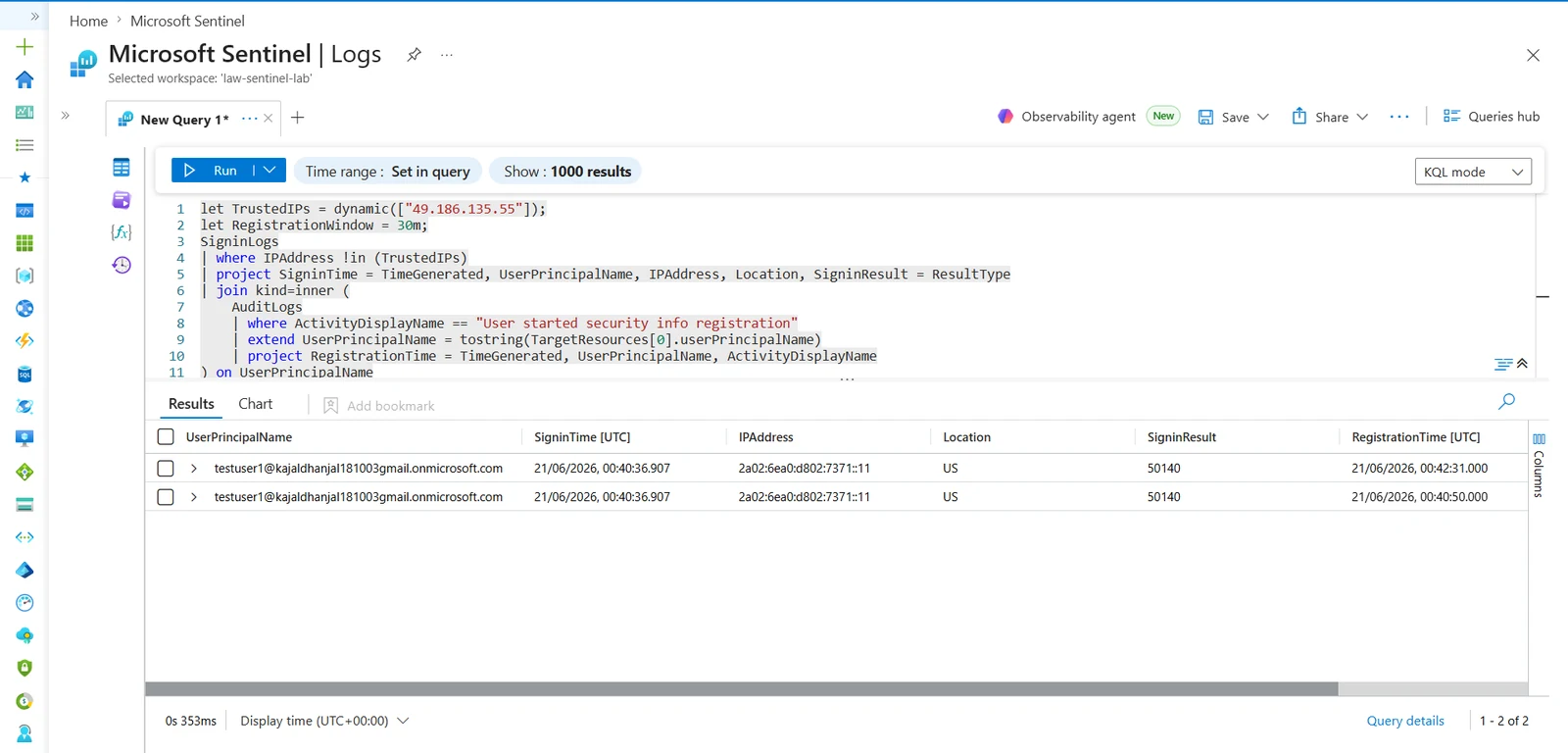
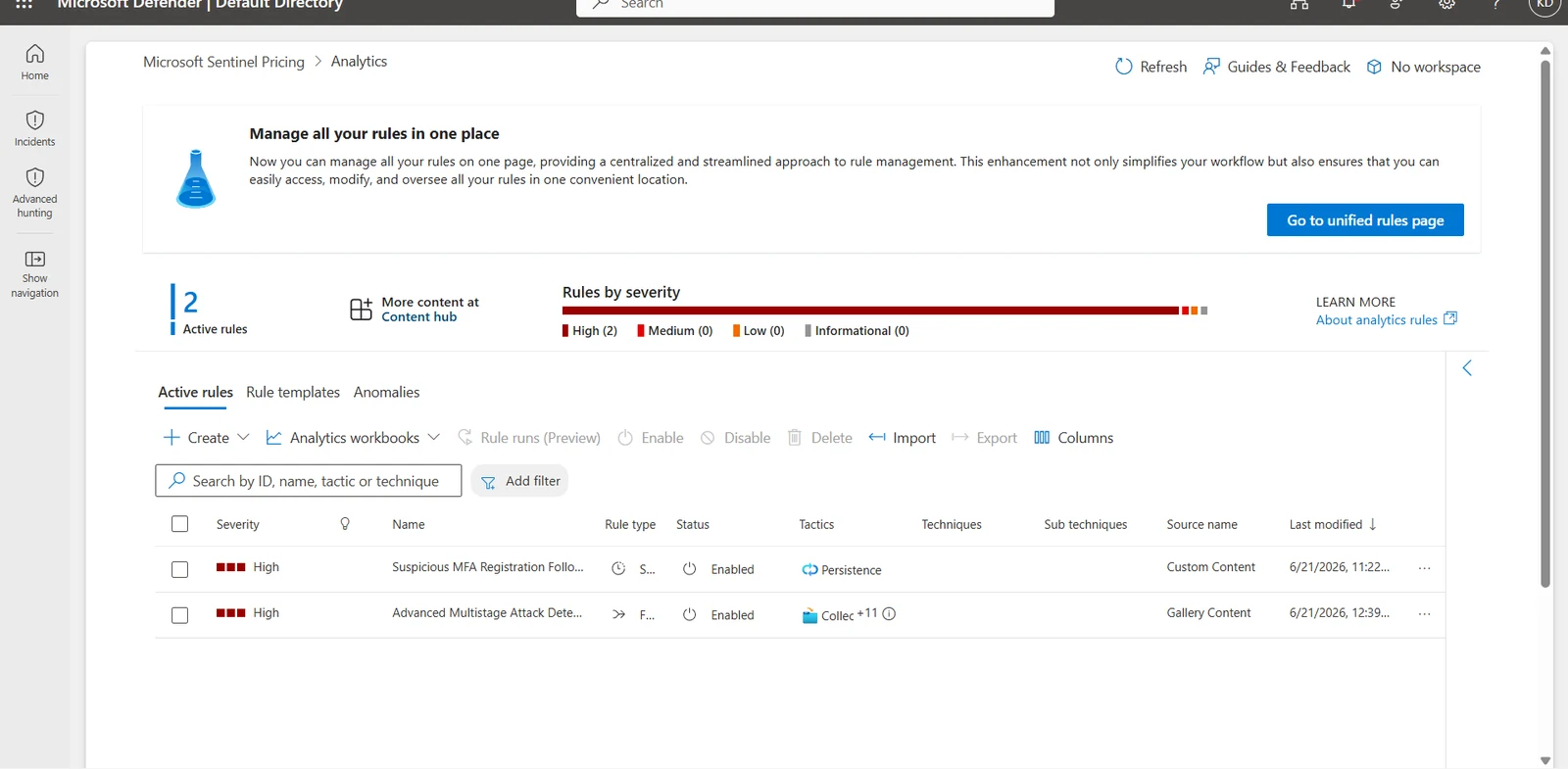
The trusted-IP list itself should live in a Sentinel watchlist, not hardcoded in the query. That wasn't the plan — it's a workaround for a Defender XDR bug where the watchlist upload UI silently failed every time I tried to create one. I'm naming that explicitly instead of quietly shipping around it, because "the UI was broken so I hardcoded it" is a real tradeoff between maintainability and shipping something that actually works today.
Validating it for real
Same approach as every detection before this one — generate real telemetry, don't trust synthetic test rows. I signed in normally from my real IP first, to establish a baseline in SignInLogs.
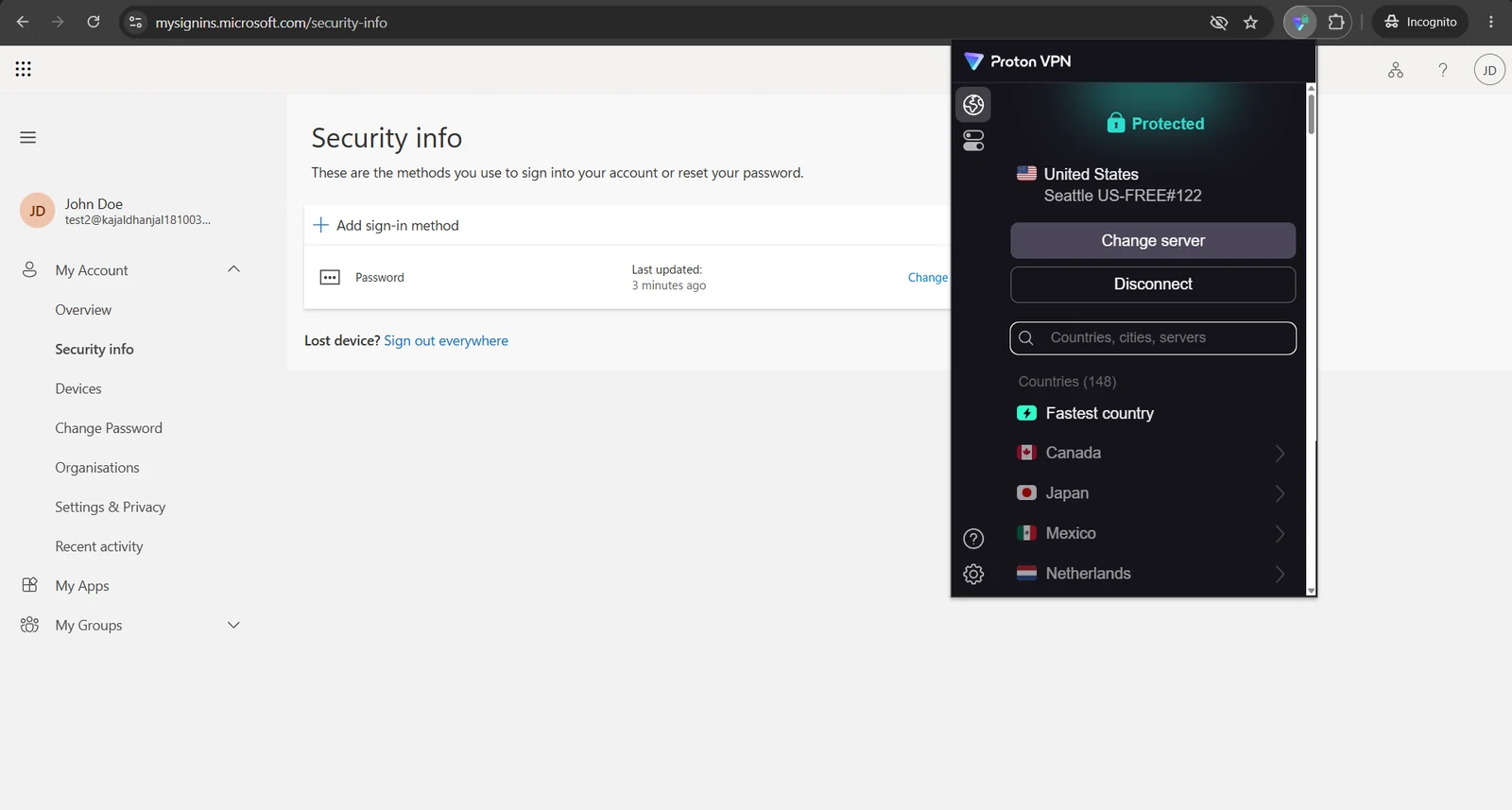
Then I connected through Proton VPN to a Seattle exit node and signed in again from there. From that same VPN session, I registered a new MFA method — the actual technique, not just a suspicious login on its own. Both events correlated back to the same UserPrincipalName and fired the rule.
The part that's actually new: the detection talks back!
Every detection before this one stopped the second an incident was raised. This is the first one that doesn't.
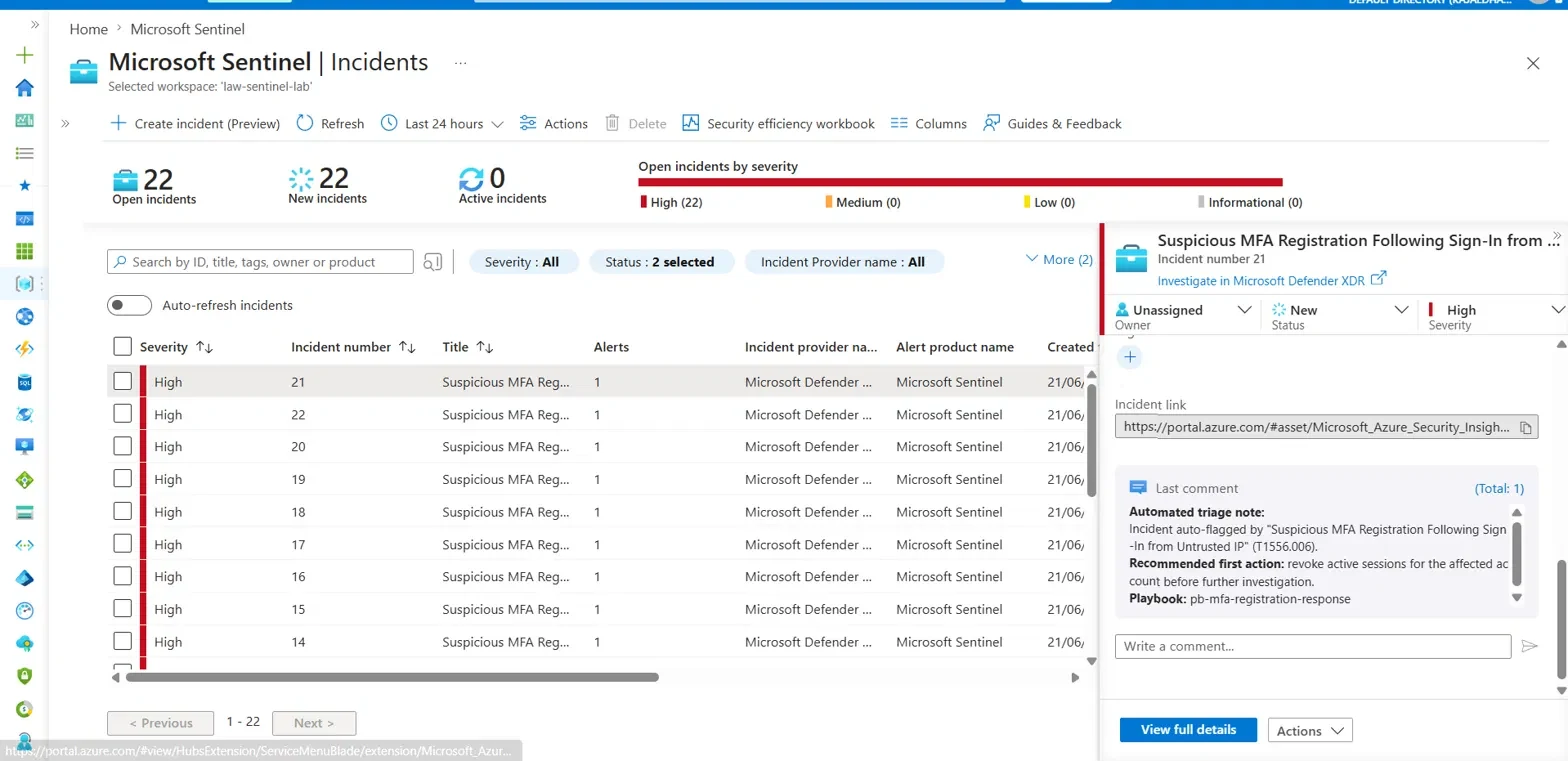
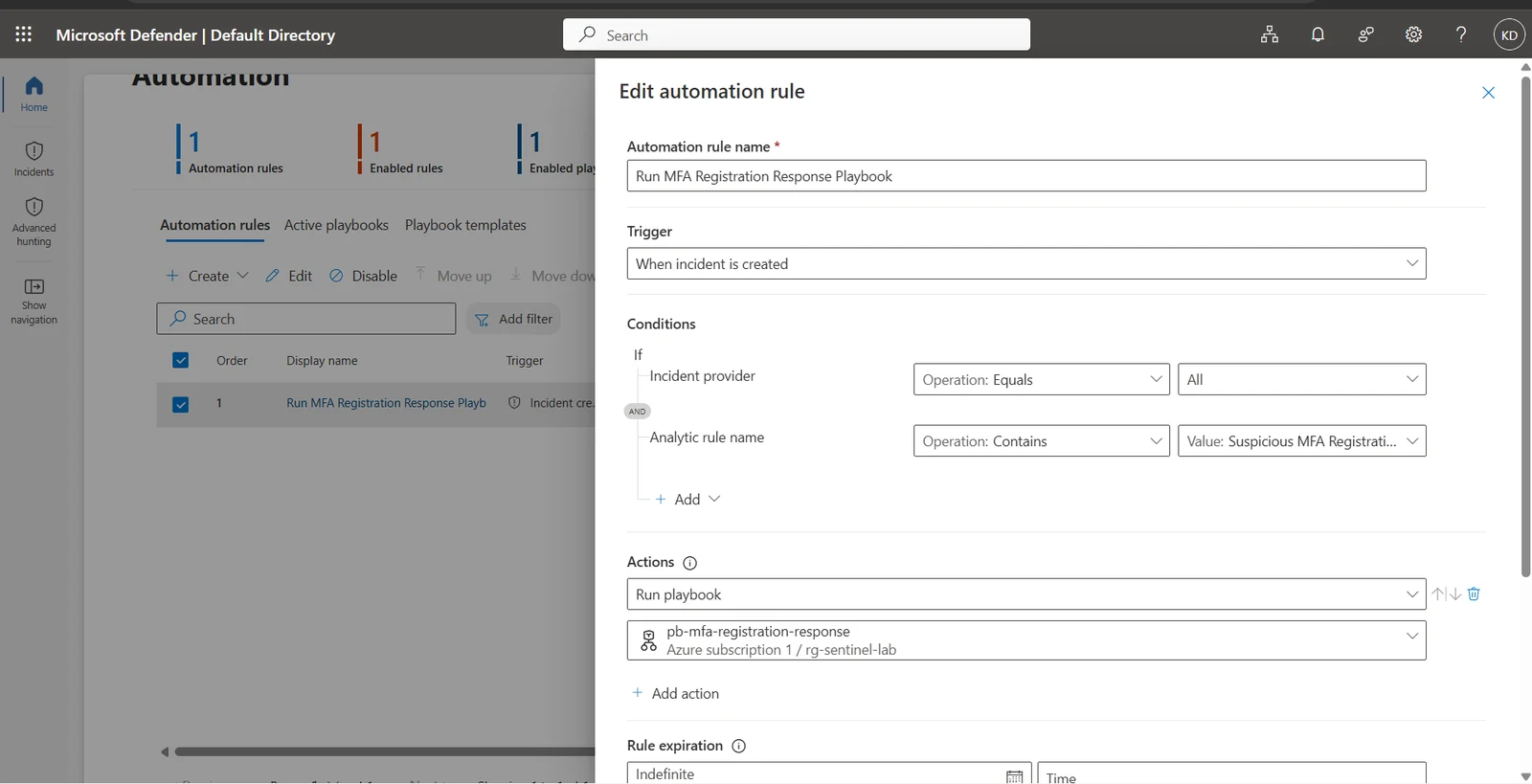
I wired a Sentinel automation rule to fire on incident creation, triggering an Azure Logic App that calls Add comment to incident (V3)—posting an automated triage note recommending the first containment step (revoking active sessions) directly onto the incident; no analyst action required to get that documented.
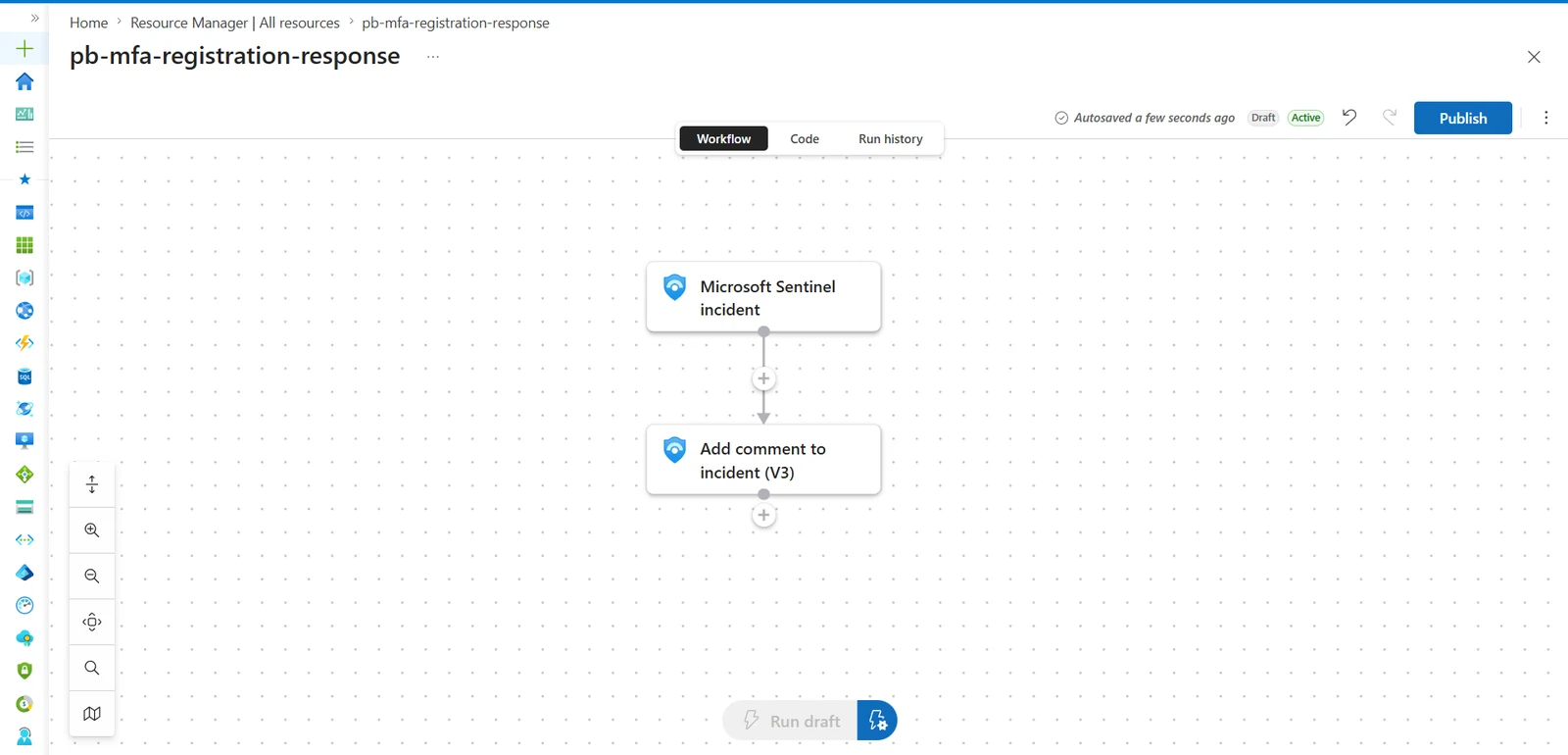
The original plan was more ambitious: have the Logic App write the flagged IP straight to a watchlist as a lightweight auto-block. The same broken watchlist UI that forced the hardcoded IP list also made watchlist writes unreliable from Logic Apps. So I scoped the automation down to the smaller, reliable action instead. A working "add comment" beats a watchlist write that fails silently half the time—and knowing when not to build the more impressive version turned out to be its own skill, separate from knowing how.
What I took from this one
-
A missing license is a constraint to design around, not a reason to stop. Variant B isn't as good as a real risk score, and saying so plainly is more useful than pretending otherwise.
-
The reliable action beats the ambitious one more often than I expected. I had a more impressive automation in mind, and the platform itself talked me out of it. That's a real engineering decision, not a consolation prize.
-
Dedup has a blind spot I didn't see coming. My
summarize-based deduplication only protects against repeats inside one query run's lookback window—it doesn't stop the same real event from raising a second incident if it's still inside the window on the next scheduled run. I found this from actual duplicate incidents during testing, not from reading the docs first. A production version needs state tracking across runs, not just within one.
The IR playbook
Detection is half the job. Here's what I actually do when this fires—written for a solo analyst, because that's what I am in this lab. No handoff tier, no triage queue; every step assumes I'm the only one responding.
Triage first: Is this real, or just a user on a new device?
Pull the user's sign-in history for the past week and look for a clean break—a normal-location baseline, then an abrupt shift to the flagged IP right before the registration. Then pull the audit log sequence for what was actually registered. A pattern of delete existing method → register new method, both from an untrusted IP, is the strongest tell—it suggests the attacker is replacing the victim's factor with their own, not just adding one. If the source IP traces to hosting or anonymizer infrastructure rather than a residential or known-VPN range, that alone is enough to skip straight to containment without waiting on the user to respond.
Why containment comes before full investigation here.
If the alert is real, the attacker may already have a working MFA method on the account. Every minute spent investigating first is a minute that the persistence mechanism survives a password reset.
Step 1 — Revoke sessions, not the account. Revoking active sessions (Revoke-MgUserSignInSessionor Users → [user] → Revoke sessions in the portal) is the right first move over disabling the account outright—it kills the attacker's stolen tokens immediately and forces re-authentication, without the broader disruption of locking the legitimate user out too.
Step 2 — Remove the attacker-registered MFA method. This is the step that actually evicts the persistence. Revoking sessions alone leaves the planted factor sitting there for the attacker to reuse the next time they authenticate.
Step 3 — Force a password reset. Credentials should be assumed compromised at this point.
Step 4—Re-enroll the legitimate user on a verified, out-of-band channel—not through any contact detail that might have been altered during the compromise. Sequencing matters here: revoke first, then remove the rogue factor and reset the password. Doing it in reverse order risks the attacker re-establishing a session before you've actually cut them off.
Eradication, before closing.
Check for inbox forwarding rules and newly consented enterprise applications—both common follow-on persistence techniques once an attacker has a foothold and easy to miss if you stop at "removed the MFA method."
Post-incident, hunt for the same pattern across other users.
If one credential set was compromised, there's a real chance others were too—the same correlation logic, run across the whole tenant for the past two weeks, surfaces anyone else with the same sign-in-then-registration pattern.
Escalation is about scope, not severity.
Single account, contained quickly → handle it end-to-end and close it. Multiple users, or a privileged account, in the same window → this isn't a single-account event anymore; treat it as a possible wider intrusion and broaden the hunt.
One thing I want to be explicit about: the Logic App automatically posts a comment recommending Step 1 the moment the incident is created, but it doesn't perform the revocation itself. That's a deliberate line, not a gap to fix later. Locking a user out is a judgment call (is this actually an attacker or the account owner traveling?), and that judgment stays with a person. Automating the recommendation but not the action was the right call for this one.
Where this is going
Five detections now—brute force, suspicious PowerShell, registry persistence, the recon-burst detection from Part 4, and this one. Next up: an isolated honeypot VM for Atomic Red Team validation and an AI-assisted triage layer sitting on top of the incidents this lab already generates. That's Part 6.
Shadow AI and the Detection That's Honest About What It Hasn't Proven Yet
Spotted an error or have a suggestion?
Email me
Kajal Dhanjal
I build detections in my own Microsoft Sentinel lab and write up what holds and what doesn’t. About