Building a Sentinel detection lab · Part 7
Building a Sentinel Detection Lab, Part 7: The Detection That Taught Me My Own Telemetry's Blind Spot
Where AI tooling talks to once it's running, and the most useful failure in the lab so far.
Repo: github.com/Kajal-Dhanjal/sentinel-detection-lab
Part 6 caught AI tooling launching. The natural next question was what happens once it's running—specifically, where does it talk to? This is the most useful failure I've had in this lab so far. Not because the detection didn't work, but because chasing down why it didn't work taught me something true about my own setup that I wouldn't have found any other way.
The plan
Simple idea: match Sysmon network-connection events (Event ID 3) against a list of known AI provider domains—OpenAI, Anthropic, Google's Gemini, and Hugging Face. Write the query, load a page, watch it fire.
It didn't fire. Not once.
Chasing the gap
First check: are EID 3 events even landing in the table at all? Yes — plenty of them. So the join logic wasn't the problem; the matching was.
Second check: what does DestinationHostname actually look like for connections I know are real? Even confirmed traffic—Ollama calling out, a browser loading Hugging Face—showed either a CDN edge hostname (*.bc.googleusercontent.com) or a blank field. Never the literal domain typed into the address bar. Domain-string allowlisting was never going to work reliably against this data, full stop.
Third check, and the one that actually mattered: I ran summarize count() by Image across EID 3 events. Zero msedge.exe rows. Not low — zero. Despite multiple tabs open, including a Hugging Face page I'd just loaded myself to test against.
The root cause: the SwiftOnSecurity Sysmon baseline config — the same config I've been running since Part 1—deliberately excluding browser processes from network-connection logging for noise reduction. This wasn't a bug in my query. It was a real, documented limitation of the telemetry source I'd chosen, and I hadn't known about it until I went looking.
Redesigning around what the data can actually show
Once I understood that, the fix wasn't a smarter regex — it was scoping the detection to match what's actually visible. I pivoted from domain-matching to process-plus-port matching: known AI-tooling processes (ollama.exe, llamafile.exe, python.exe, node.exe, etc.) making an outbound connection on 443 or 80, regardless of where it's headed.
Event
| where Source == "Microsoft-Windows-Sysmon"
| where EventID == 3
| extend Image = extract(@"Image:\s+(\S+)", 1, RenderedDescription)
| extend ProcessName = tolower(tostring(split(Image, "\\")[-1]))
| extend DestinationHostname = extract(@"DestinationHostname:\s+(\S+)", 1, RenderedDescription)
| extend DestinationIp = extract(@"DestinationIp:\s+(\S+)", 1, RenderedDescription)
| extend DestinationPort = extract(@"DestinationPort:\s+(\S+)", 1, RenderedDescription)
| where ProcessName has_any ("ollama.exe", "llamafile.exe", "lmstudio.exe", "python.exe", "node.exe")
   and DestinationPort in ("443", "80")
| project TimeGenerated, Computer, Image, DestinationHostname, DestinationIp, DestinationPort
It's less precise about where the traffic goes but far more reliable given what I now know about my own config. Validated organically: Ollama on the VM was already making real outbound calls to Google-hosted infrastructure on port 443, caught without my needing to deliberately trigger anything. 8 matching rows once the new logic was in place.
The honest scope statement
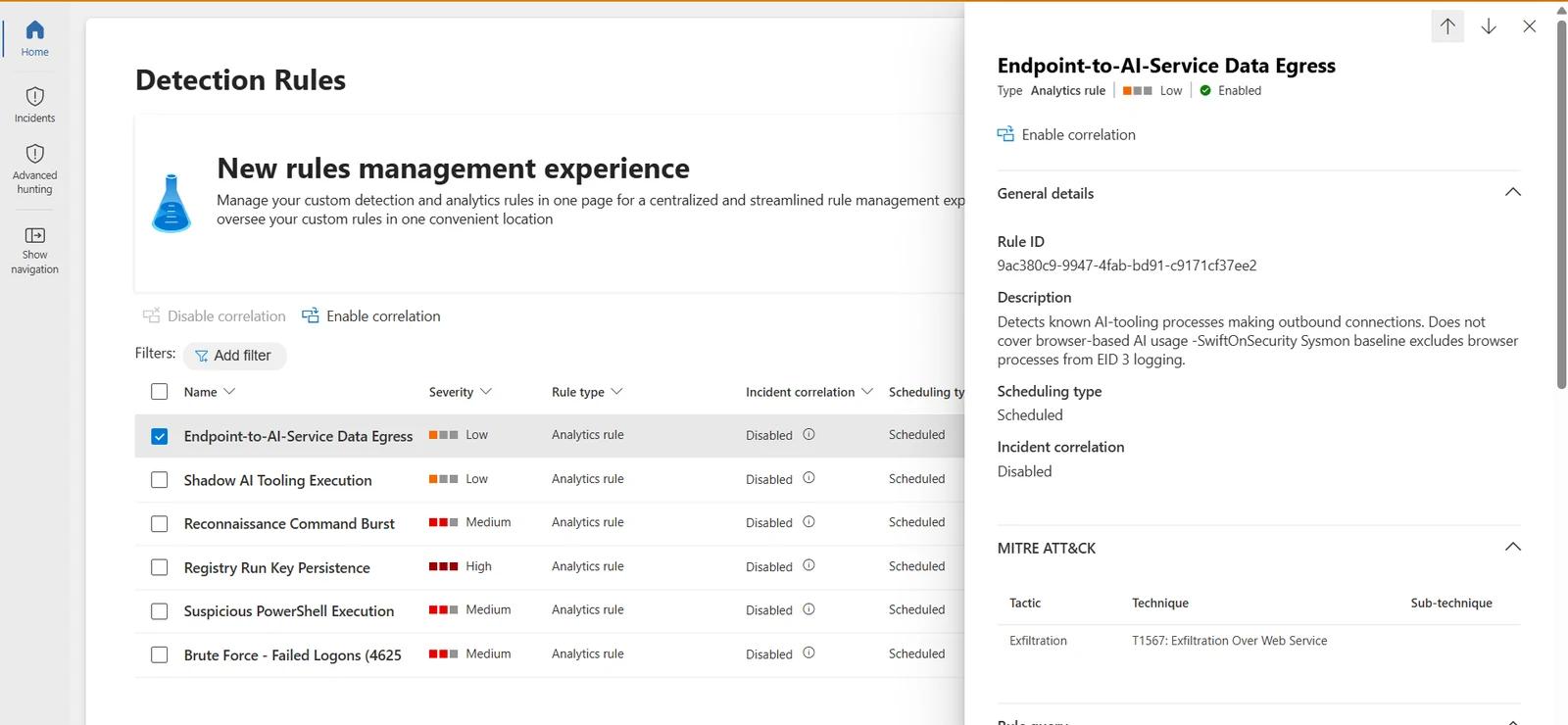
This detection catches non-browser AI egress — local tools and scripts calling out directly. It does not catch someone pasting sensitive data into ChatGPT's web interface, because the browser traffic that would carry that simply isn't in this telemetry. That's a real, structural gap, and instead of letting it sit quietly in a comment somewhere, I wrote it straight into the rule's description in Sentinel: "Does not cover browser-based AI usage — SwiftOnSecurity Sysmon baseline excludes browser processes from EID 3 logging." Anyone reading the rule in six months, including me, sees the limitation without having to dig.
What I took from this one
-
A detection is only as good as your understanding of what its data source can see. I'd assumed Sysmon's network logging was comprehensive. It isn't, by design, and that design choice exists for good reasons but it has to factor into scope, not get discovered after the fact and quietly ignored.
-
"It doesn't fire" needs the same rigor as "it fires." Treating a non-result as a debugging problem, not a dead end, is what actually surfaced the real limitation here.
-
Document the gap in the rule itself, not just in your head. A scope limitation that only exists as something I personally remember isn't documentation—it's a landmine for whoever inherits this rule next.
Next up: a different kind of AI-related signal — not the tool running, not its traffic, but what it spawns. Part 8 picks up where an agent shells out and decides whether that pattern is worth flagging on its own.
#cybersecurity #sentinel #microsoft-sentinel #kql #detection-engineering #blueteam #azure #ai-security
Watching for Agents, Not Just Attackers
Spotted an error or have a suggestion?
Email me
Kajal Dhanjal
I build detections in my own Microsoft Sentinel lab and write up what holds and what doesn’t. About