Social engineering in the logs · Part 1
What an MFA prompt actually proves.
Seven sign-in methods, what each one attests, and how each one gets beaten.
Every MFA prompt answers one narrow question: did someone have this factor, at this moment?
That is a useful question. It is also not the question most of us think MFA is answering. We treat a completed MFA prompt as proof that the right person is signing in, on purpose, to the right site. Most methods prove none of those three things.
The difference matters, because attackers do not need to break the factor. They only need to work in the space between what the factor proves and what we assume it proves.
Each row below is a common sign-in method. The columns ask what it proves, what it does not, and how that gap gets used.
| Method | What it proves | What it does not prove | How it gets beaten |
|---|---|---|---|
| SMS code | Someone could read a message sent to that phone number | That the number is still on the user's SIM, or where the code was typed | SIM swap, SS7 interception, real-time phishing [1], [2] |
| Voice call code | Someone could answer a call to that phone number | Same as SMS: the number is not the phone | SIM swap, SS7 interception, real-time phishing [2] |
| Authenticator app code (TOTP) | Someone had the app or its seed when the code was generated | Which site the code was typed into | Real-time phishing relay [1], [2] |
| Push approval | Someone holding the enrolled device tapped Approve | That they started the sign-in | Push bombing until someone taps Approve [2], [3] |
| Push with number matching | The approver could see a sign-in screen showing the number | That the sign-in screen was the real one | A relay that passes the real number through to a fake page [2], [4], [10] |
| Passkey or FIDO2 security key | A private key scoped to this site signed a challenge, and the browser bound the request to the real origin | Who holds the session after sign-in | Session token theft after sign-in, fallback to a weaker method, help desk reset [3], [6], [7], [8] |
| Windows Hello for Business | A key tied to this device signed in, unlocked by a local PIN or biometric | Who holds the session after sign-in | Session token theft after sign-in, fallback to a weaker method, help desk reset [3], [8], [9] |
Three things the table shows
The phone number is not the phone. SMS and voice codes go to a number, and a number can be moved to another SIM. NIST now treats the public phone network as a restricted authenticator, and advises verifiers to consider signals like SIM change and number porting before relying on it [1]. CISA ranks SMS and voice as the weakest form of MFA, vulnerable to phishing, SS7 attacks and SIM swaps [2].
Codes and taps do not know where they are going. An authenticator code is valid wherever it is typed. A push approval is valid for whichever sign-in triggered it. NIST is direct about it: OTP and out-of-band authentication are not phishing resistant [1]. Number matching fixed one specific problem. It stops someone approving a prompt they never started, because they now need a number from a screen in front of them [4]. Microsoft now has it on for every Authenticator push, with no opt out [5]. But a relay sits in the middle of the real session, so the number the victim sees is the genuine one, arriving on a page that is not [10]. CISA's own ranking says it plainly: number matching is resistant to push bombing and still vulnerable to phishing [2].
In 2022 Microsoft described a campaign that had targeted more than 10,000 organisations since September 2021 using exactly this gap [10]. The attacker sat between the user and the real sign-in page, relayed everything both ways, and kept the session cookie at the end. Microsoft's description of the outcome applies to every row above: the attacker "gets authenticated to a session on the user's behalf, regardless of the sign-in method" [10].
Only origin-bound methods check the address, and even they stop at the door. Passkeys, FIDO2 keys and Windows Hello for Business are different in kind. A WebAuthn credential works only with the entity it was registered to, and the origin the browser actually sees is part of what gets signed [7]. A lookalike domain gets nothing it can use. That is why CISA names FIDO/WebAuthn and PKI-based methods as the phishing-resistant forms of MFA [2], and why Microsoft's phishing-resistant authentication strength allows only Windows Hello for Business or platform credential, FIDO2 keys and multifactor certificate-based authentication [9].
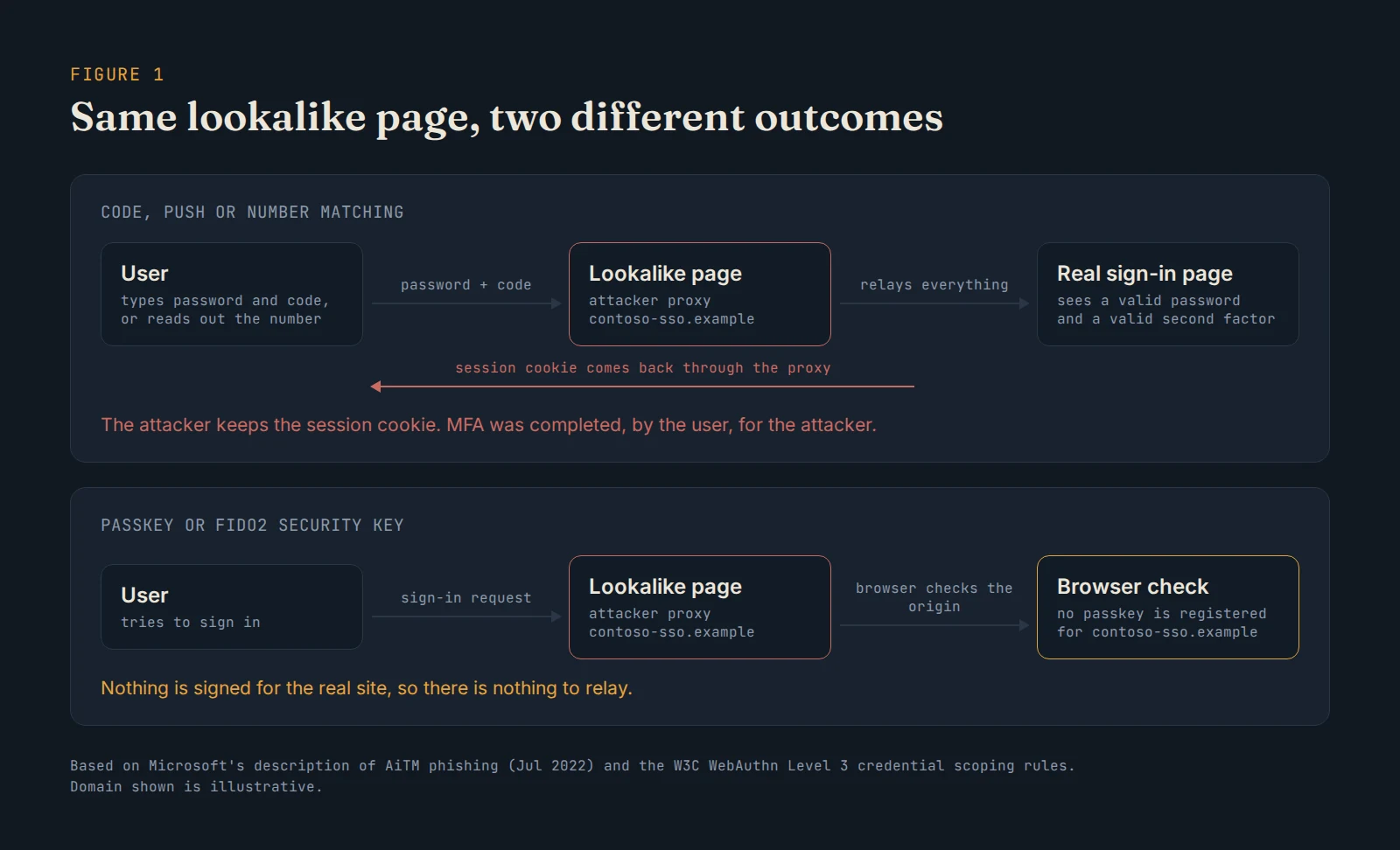
Figure 1. Same lookalike page, two different outcomes.
But look at the third column for those rows. Strong MFA protects the sign-in. It does not protect the session that comes out of it. Microsoft's guidance on token theft puts it this way: replaying a token "issued to an identity that has already completed multifactor authentication" satisfies MFA, and access is granted [8]. Commodity credential theft malware steals browser cookies for exactly this reason [8]. And if an account can still fall back to SMS, or a help desk will reset the factor over the phone, the attacker simply picks the weaker door [3].
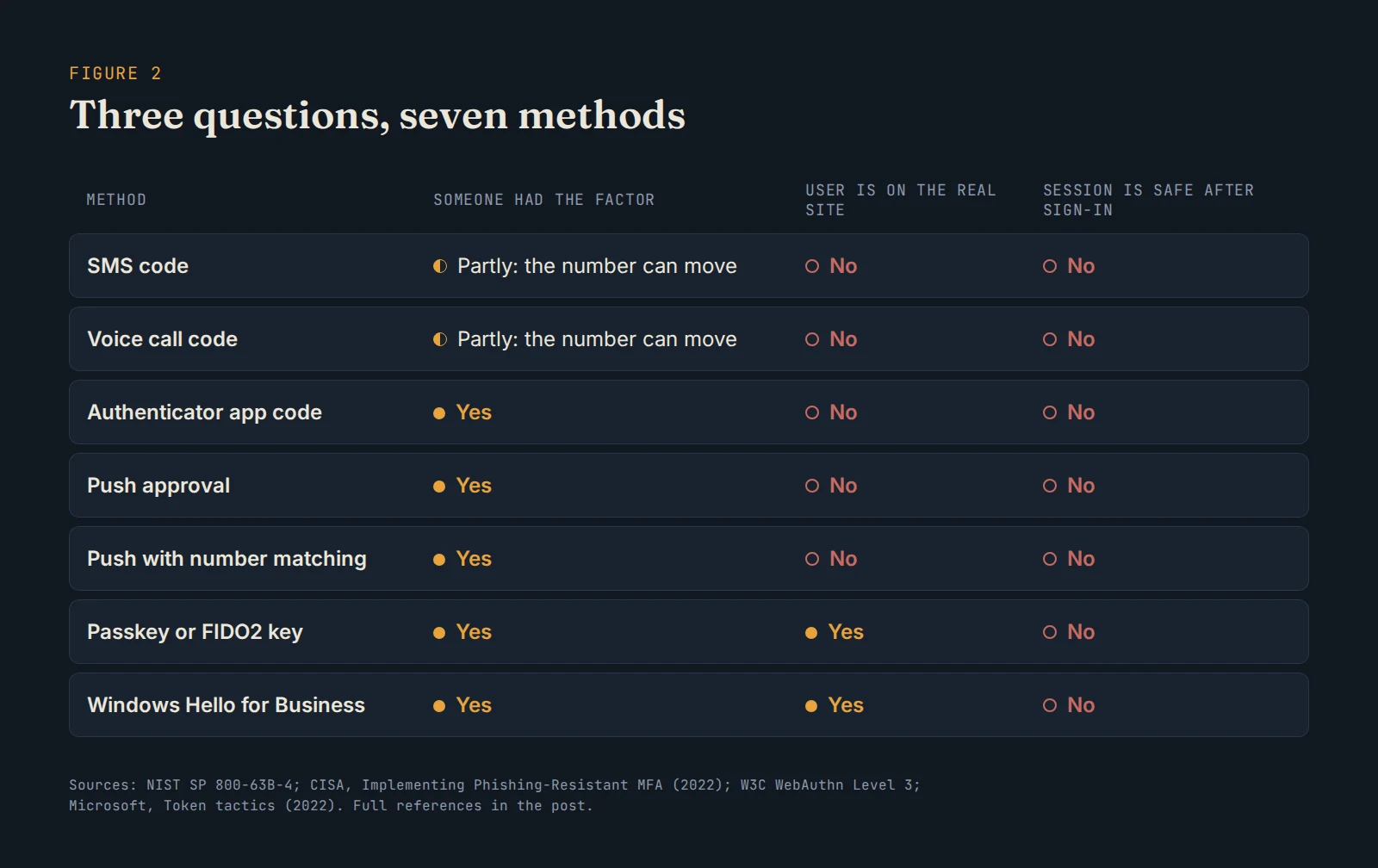
Figure 2. Three questions, seven methods. Only two methods check the site, and none protect the session after sign-in.
What happened at Uber
In September 2022, Uber published what happened to them [11]. Uber says it is likely the attacker bought the contractor's corporate password on the dark web, after malware had infected the contractor's personal device. The attacker then kept trying to log in. Each attempt sent the contractor a login approval request, and at first that blocked access. Eventually, the contractor accepted one, and the attacker was in [11].
Run that through the table. The password was already gone. The push prompt proved exactly what the push row says it proves: someone holding the enrolled device tapped Approve. It never proved that the person tapping had started the sign-in, and nothing in the flow asked.
Uber said it believes the attacker is affiliated with Lapsus$ [11]. The next year, a joint advisory on Scattered Spider described the same playbook at scale: repeated MFA prompts until someone presses Accept, SIM swaps, and social engineering of IT help desks to reset passwords or MFA tokens [3]. That advisory has since been updated with investigations running through June 2025, and now carries seven agencies including Australia's ACSC [3].
Why people press Approve
It is tempting to read the Uber story as a user who should have known better. I do not think that is the useful reading.
For most people, Approve is a button pressed often and almost always correctly. Repetition turns it into a reflex, not a decision. A push prompt asks someone to make a security judgement with no context, in a second, often while they are doing something else. Repeated prompts turn a refusal into a cost: the phone keeps buzzing until you make it stop. And the help desk is staffed by people whose job is to get colleagues back to work quickly.
None of those are failures of the people involved. They are properties of the design. A factor that relies on a person's judgement in that moment inherits every pressure that moment carries. The methods at the bottom of the table are stronger partly because they stop asking the human to make that call. The browser checks the origin. The person never has to.
What to do with this
- Put phishing-resistant MFA where the damage would be worst first. Admins, finance and anyone who can approve payments. In Entra, that is the phishing-resistant authentication strength in Conditional Access [9].
- Remove the fallback, not just the weak default. If SMS or voice remains a registered method, it is still a way in [1], [3].
- Treat the help desk as part of MFA. Factor resets need verification that cannot be done by someone who has read the user's LinkedIn profile [3].
- Assume a strong sign-in can still lead to a stolen session. Plan detection and response for token replay, not only for failed sign-ins [8], [10].
MFA is still one of the best controls we have. It just answers a smaller question than the one we keep asking it. Before trusting a prompt, ask what it actually proved.
References
[1] National Institute of Standards and Technology, "Digital Identity Guidelines: Authentication and Authenticator Management," NIST SP 800-63B-4, 2025. [Online]. Available: https://pages.nist.gov/800-63-4/sp800-63b.html
[2] Cybersecurity and Infrastructure Security Agency, "Implementing Phishing-Resistant MFA," Fact sheet, Oct. 2022. [Online]. Available: https://www.cisa.gov/sites/default/files/publications/fact-sheet-implementing-phishing-resistant-mfa-508c.pdf
[3] Federal Bureau of Investigation et al., "Scattered Spider," Joint Cybersecurity Advisory AA23-320A, Nov. 16, 2023, updated Jul. 29, 2025. [Online]. Available: https://www.cisa.gov/news-events/cybersecurity-advisories/aa23-320a
[4] Cybersecurity and Infrastructure Security Agency, "Implementing Number Matching in MFA Applications," Fact sheet, Oct. 2022. [Online]. Available: https://www.cisa.gov/sites/default/files/publications/fact-sheet-implement-number-matching-in-mfa-applications-508c.pdf
[5] Microsoft, "How number matching works in multifactor authentication push notifications for Authenticator," Microsoft Learn. [Online]. Available: https://learn.microsoft.com/en-us/entra/identity/authentication/how-to-mfa-number-match
[6] FIDO Alliance, "Passkeys." [Online]. Available: https://fidoalliance.org/passkeys/
[7] W3C, "Web Authentication: An API for accessing Public Key Credentials, Level 3." [Online]. Available: https://www.w3.org/TR/webauthn-3/
[8] Microsoft Security, "Token tactics: How to prevent, detect, and respond to cloud token theft," Microsoft Security Blog, Nov. 16, 2022. [Online]. Available: https://www.microsoft.com/en-us/security/blog/2022/11/16/token-tactics-how-to-prevent-detect-and-respond-to-cloud-token-theft/
[9] Microsoft, "Conditional Access authentication strengths," Microsoft Learn. [Online]. Available: https://learn.microsoft.com/en-us/entra/identity/authentication/concept-authentication-strengths
[10] Microsoft Security, "From cookie theft to BEC: Attackers use AiTM phishing sites as entry point to further financial fraud," Microsoft Security Blog, Jul. 12, 2022. [Online]. Available: https://www.microsoft.com/en-us/security/blog/2022/07/12/from-cookie-theft-to-bec-attackers-use-aitm-phishing-sites-as-entry-point-to-further-financial-fraud/
[11] Uber, "Security update," Uber Newsroom, Sep. 16, 2022, updated Sep. 19, 2022. [Online]. Available: https://www.uber.com/newsroom/security-update/
Spotted an error or have a suggestion?
Email me
Kajal Dhanjal
I build detections in my own Microsoft Sentinel lab and write up what holds and what doesn’t. About