Building a Sentinel detection lab · Part 2
Building a Sentinel Detection Lab, Part 2: Suspicious PowerShell, and Why Some Detections Need No Threshold
Hunting malicious PowerShell with Sysmon, and the difference between volume detections and signature detections.
Part 2 of a series on building a detection engineering lab in Microsoft Sentinel. This post: hunting malicious PowerShell with Sysmon, and the difference between volume detections and signature detections.
In Part 1 I built a brute-force detection that counted failed logins and fired when the count crossed a threshold. This one is different in a way that turns out to matter: it doesn't count anything. A single match is enough. Understanding why is one of the more useful distinctions in detection engineering.
The threat
Attackers love PowerShell because it's everywhere and powerful. They tend to launch it with flags that legitimate users rarely combine:
-
enc/-EncodedCommand— base64-encoded commands, to hide intent -
w hidden/-windowstyle hidden— run invisibly -
ExecutionPolicy Bypass— skip PowerShell's safety controls -
downloadstring,iex,invoke-expression— download-and-run "cradles" that pull remote code
Sysmon logs every process launch as Event ID 1, including the full command line. That command line is what we hunt.
Extracting the command line
Same lesson as Part 1: the useful data lives inside RenderedDescription, not a tidy column. A Sysmon process-creation event packs in the image path, command line, parent process, user, and hashes — all as text. So I extract the two fields I need:
| extend Image = extract(@"Image:\s+(\S+)", 1, RenderedDescription)
| extend CommandLine = extract(@"CommandLine:\s+(.+?)\s+CurrentDirectory:", 1, RenderedDescription)
The CommandLine extraction uses a lazy (.+?) and anchors on the next field (CurrentDirectory:) so it grabs exactly the command line and nothing more.
The detection
Event
| where Source == "Microsoft-Windows-Sysmon"
| where EventID == 1
| extend Image = extract(@"Image:\s+(\S+)", 1, RenderedDescription)
| extend CommandLine = extract(@"CommandLine:\s+(.+?)\s+CurrentDirectory:", 1, RenderedDescription)
| where Image has "powershell" or Image has "pwsh"
| where CommandLine has_any ("-enc", "-EncodedCommand", "-nop", "-noprofile", "-w hidden", "-windowstyle hidden", "-exec bypass", "-executionpolicy bypass", "downloadstring", "iex", "invoke-expression", "frombase64string")
| project TimeGenerated, Computer, Image, CommandLine
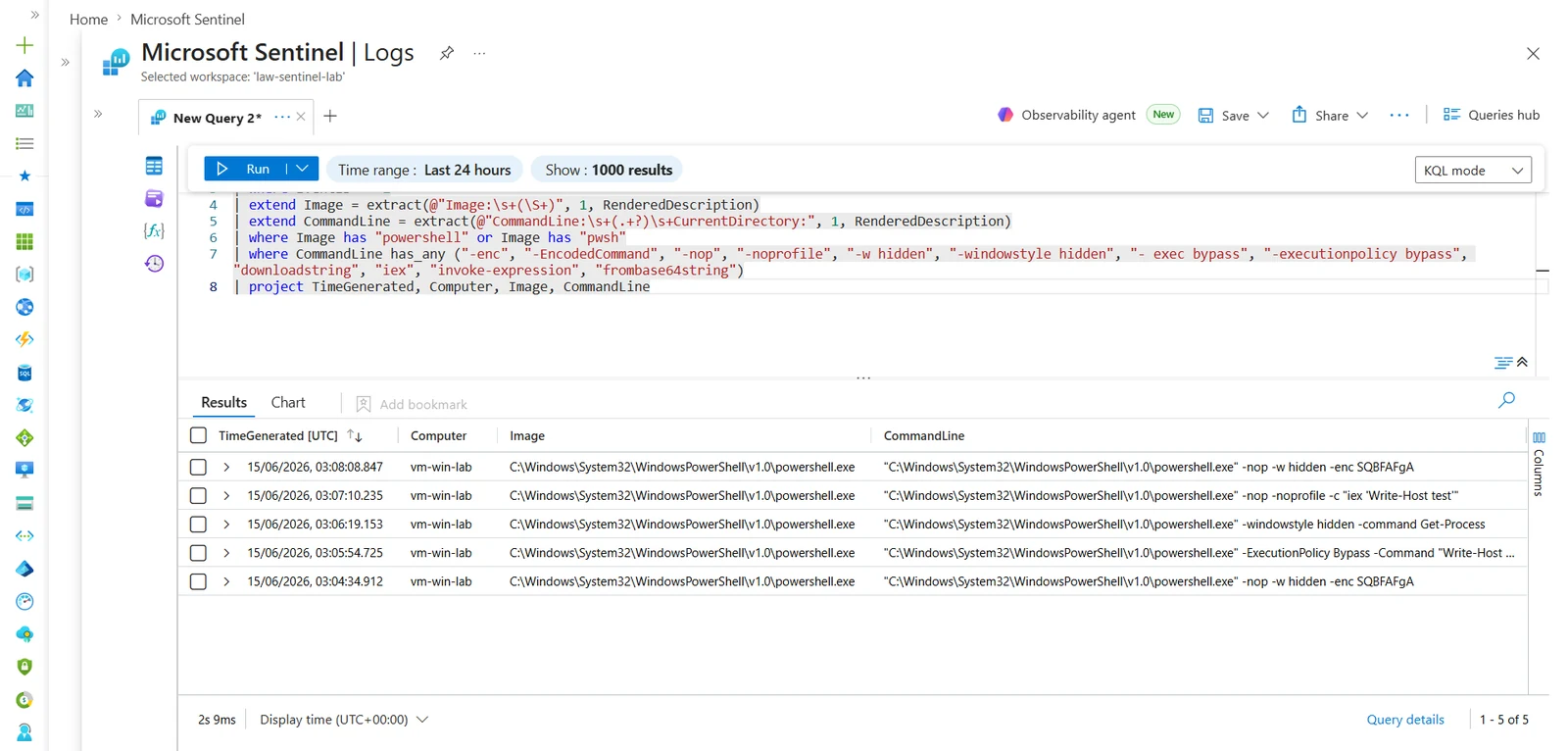
The key operator is has_any(...) — it matches if the command line contains any of those suspicious strings.
Volume detection vs. signature detection
Here's the distinction that matters. The brute-force rule in Part 1 needed a threshold (count >= 5) because no single failed login is suspicious — volume is the signal. This PowerShell rule needs no threshold at all. A single encoded, hidden PowerShell launch is suspicious on its own — the signature is the signal.
So:
-
Volume detections aggregate and threshold (brute force, password spray, data exfil).
-
Signature detections fire on a single match (known-bad command flags, known-bad file hashes, known-bad registry keys).
Knowing which kind you're writing tells you whether you need summarize and a count or just a where clause that matches the bad thing.
Validation
There was no malicious PowerShell in my logs to start with — so unlike the brute-force rule (where failed logins already existed), I had to generate the test data first. I ran benign-but-suspicious-looking PowerShell on the VM:
powershell.exe -nop -w hidden -enc SQBFAFgA
powershell.exe -ExecutionPolicy Bypass -Command "Write-Host hello"
powershell.exe -windowstyle hidden -command "Get-Process"
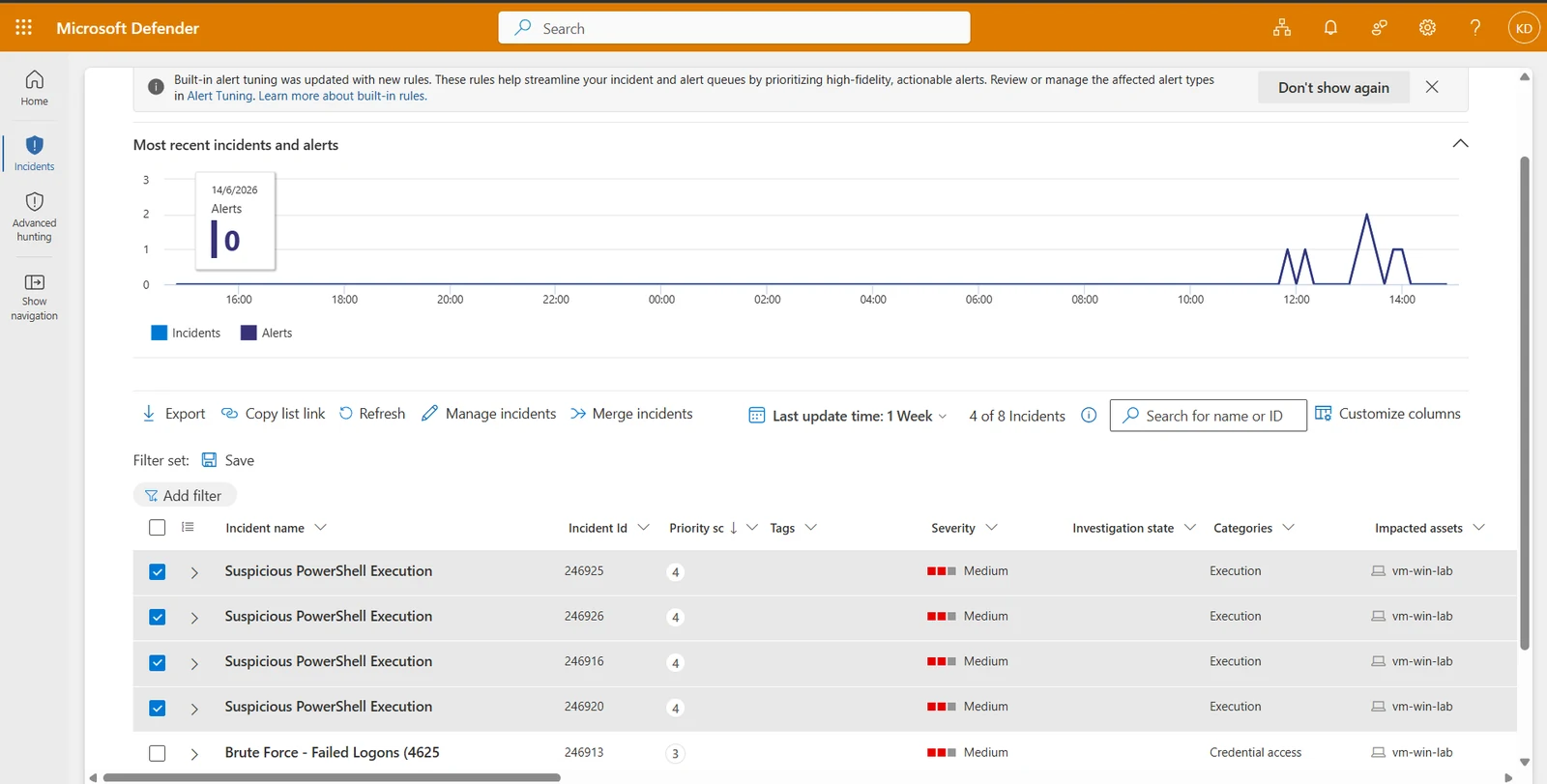
These are harmless — they carry the flags attackers use but do nothing damaging. Importantly, the process launch is the logged event even when the command itself errors. The detection caught all of them, and the scheduled rule raised incidents under the Execution category.
Known false positives (and tbeing honest about them)
-nop and -ExecutionPolicy Bypass are occasionally used by legitimate admin scripts. In production I'd tune this — require two or more suspicious flags together, or allowlist known-good signed scripts by hash. For a lab, single-flag matching is fine and demonstrates the technique. But pretending a detection has zero false positives is how you lose credibility; naming them is part of the job.
Takeaways
-
Not every detection needs a threshold. Decide whether volume or signature is your signal.
-
has_any()is your friend for matching against a list of known-bad strings. -
Generate test data first for signature detections — the malicious thing has to exist before you can catch it.
Next post: registry persistence — and the false positive that taught me the single most important lesson in detection engineering.
Full lab and detections on GitHub.
My Detection Flagged Legitimate Windows Behavior. Here's How I Tuned It Without Going Blind
Spotted an error or have a suggestion?
Email me
Kajal Dhanjal
I build detections in my own Microsoft Sentinel lab and write up what holds and what doesn’t. About